
VisitBest guide
Best Joysticks for PC in India (2026)
Compare the 8 best joysticks and controllers for PC in India — Xbox Wireless Controller, Sony DualSense, PowerA, Cosmic Byte, EvoFox and Redgear gamepads…
In this guide
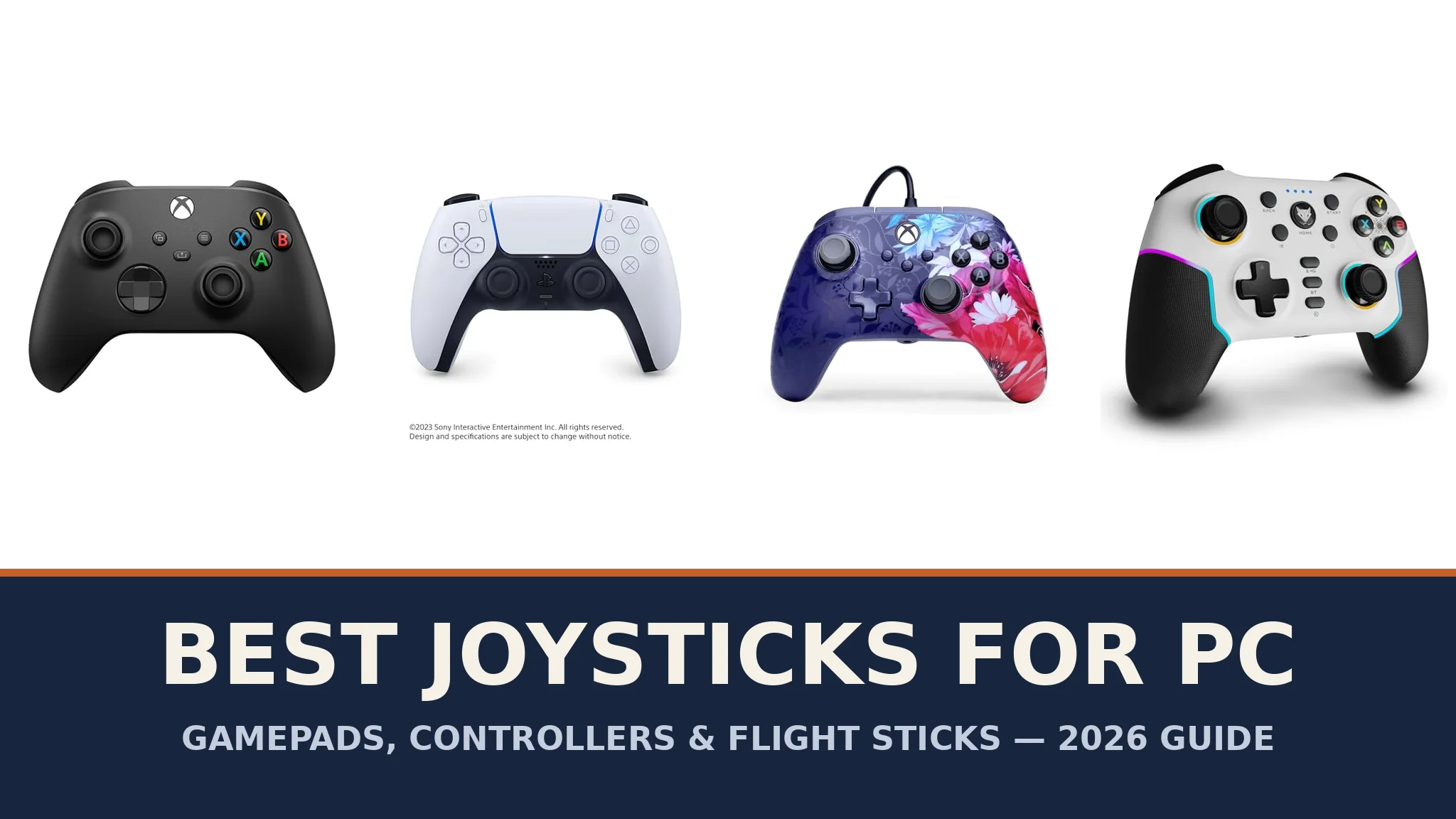
Type "joystick" into a shopping site and you will be shown two completely different kinds of product. Most results are gamepads — the two-handed controllers with twin thumbsticks that most PC gamers actually mean when they say "joystick". The rest are flight sticks: single upright sticks, often paired with a separate throttle, built for flight simulators. Both are legitimate answers to the search, so this guide covers both honestly — gamepads you can buy today, and plain advice on flight sticks, where Indian stock is much harder to pin down.
Every controller reviewed below was checked on Amazon India in October 2026, and each one links to its live Amazon.in listing with its real product photo. We deliberately do not print prices: controller prices on Amazon.in move up and down with sales and stock, so any figure printed here could be wrong within days. Use the "Check price on Amazon" buttons to see the live price before you decide. What does not change is what each controller is, how it connects and who it suits — and that is what this guide compares.
Our shortlist mixes the two big console-standard controllers, one officially licensed wired pad with pro features, and five Indian-market favourites from Cosmic Byte, EvoFox and Redgear that add Hall Effect sticks, tri-mode wireless and back buttons at friendlier budgets. Whatever you play — football, racing, action RPGs or flight sims — there is a sensible pick here.
Quick Answer
In a hurry? Start here:
- Best for most PC gamers: Xbox Wireless Controller — the layout and wireless standard Windows games are built around.
- Best for haptics and adaptive triggers: Sony DualSense — uniquely tactile, with its advanced features working in a range of supported PC titles.
- Best wired pad with pro features: PowerA Advantage Plus — Hall Effect sticks, back buttons and adjustable stick height, officially licensed for Xbox and PC.
- Best value tri-mode all-rounder: Cosmic Byte Ares Pro — 2.4GHz, Bluetooth and wired in one pad, with Hall Effect sticks and triggers.
- Best budget wireless: Redgear Pro Wireless — a long-running Indian favourite with force feedback and backlit keys.
- Best budget wired: Redgear Pro Wired — XInput and DirectInput support with a 1.8-metre cable.
- Actually want a flight stick? Read the flight stick section before buying anything — it explains what to look for and why we have not linked any.
Joystick, Gamepad or Flight Stick — What Do the Words Mean?
Strictly speaking, a joystick is any stick that pivots on a base and reports its angle to the computer. By that definition, the two little thumbsticks on a modern gamepad are joysticks, and so is the big upright stick of a flight controller. Everyday usage has split the word into three shopping categories, and knowing which one you mean saves a wasted order.
A gamepad (also sold as a controller) is the two-handed pad that became standard on consoles: two thumbsticks, a D-pad, four face buttons, bumpers and triggers. It suits the widest range of PC games — sports, racing, platformers, action and adventure titles — because most PC games with controller support are designed around exactly this layout. When most people search for a "joystick for PC", this is what they want.
A flight stick is a single upright joystick on a weighted base, usually with a throttle slider or a separate throttle unit (the stick-plus-throttle combination is called a HOTAS). It exists for flight and space simulators such as Microsoft Flight Simulator, DCS World and Elite Dangerous, where one precise stick controlling pitch and roll — plus a twist of the handle for the rudder — feels far more natural than a thumbstick. Outside simulators, a flight stick is the wrong tool: it has no second stick for camera control and is awkward for ordinary games.
One honest warning before the reviews: dedicated flight sticks are stocked inconsistently on Amazon India, often through short-lived import listings. When we checked on 29 October 2026 we could not verify a single flight-stick listing to the standard we apply in this guide — a live Amazon.in page whose specifications and photo we could confirm — so the buy links below are all gamepads, and flight sticks get their own advice section instead of product links. We would rather link nothing than link a listing we could not stand behind.
How to Choose the Right Controller for Your PC
Wired, 2.4GHz wireless or Bluetooth? A wired controller has zero input lag, never needs charging and is usually the cheapest way to buy a given level of quality — the trade-off is a cable across your desk. A 2.4GHz USB dongle gives you wireless freedom with a connection most players cannot distinguish from wired, and it works even on PCs without Bluetooth; keep the dongle safe, because the controller is useless without it. Bluetooth is the most flexible option for laptops, phones and tablets, though it can add a touch more latency and depends on your PC's Bluetooth quality. Tri-mode controllers offer all three and are the safest buy if you game on several devices.
Check for XInput. Windows games expect controllers to speak XInput, the Xbox input standard — an XInput pad is recognised instantly by virtually every modern PC game. Older or retro-focused pads may also offer DirectInput, the older standard, which is handy for emulators and very old games but often needs configuration in modern titles. Every controller in this guide works with Windows PC gaming; where a listing states XInput or a dual XInput/DirectInput mode, we say so in its key details. Steam's built-in Steam Input layer also translates most popular controllers, including the DualSense, for games that lack native support.
Hall Effect sticks resist drift. Ordinary thumbsticks measure movement with contact-based sensors that wear over time, and wear is what causes "stick drift" — your character moving when the stick is untouched. Hall Effect sticks and triggers measure movement magnetically, with no contact to wear out, so they are the durability upgrade to look for. Four of the controllers below use Hall Effect controls; the console-standard pads and the budget Redgear pair use conventional sticks, which is normal at their positions.
Polling rate and latency. A 1000Hz polling rate means the controller reports its state a thousand times a second, which keen competitive players value in fast games. In practice, connection type and game feel matter more to most players, but if two otherwise-equal pads differ on polling rate, take the faster one.
Compatibility beyond the PC. If you also game on a phone, tablet, Android TV or a console, check the listing's stated platforms before buying — they vary more than you would expect. The Xbox controller also works on Xbox consoles and mobiles; the DualSense is a PlayStation 5 controller that also works on PC, Mac and mobiles; several of the Indian-brand pads cover PC, Android and iOS, and one also supports the Nintendo Switch. Buy for the devices you actually own.
Battery arrangements differ. The Xbox controller runs on AA batteries; the DualSense and the Indian-brand wireless pads have built-in rechargeable batteries; dongle-based pads sip power and can run for long stretches between charges. None of these is a problem, but know which you are getting — and note that wired pads sidestep the question entirely.
Quick Comparison
| Controller | Connectivity | Sticks & triggers | Works with | Best for |
|---|---|---|---|---|
| Xbox Wireless Controller | Xbox Wireless, Bluetooth, USB-C | Standard | Windows PC, Xbox, Android, iOS | Most PC gamers |
| Sony DualSense | Bluetooth, USB-C | Standard, adaptive triggers | Windows PC, Mac, Android, iOS, PS5 | Haptics & adaptive triggers |
| PowerA Advantage Plus | Wired USB-C (10 ft cable) | Hall Effect | Windows 10/11, Xbox Series X|S, Xbox One | Wired pro features |
| Cosmic Byte Ares Pro | 2.4GHz, Bluetooth, USB-C wired | Hall Effect | PC, Android, iOS | Value tri-mode all-rounder |
| EvoFox Elite X2 Pro | 2.4GHz, Bluetooth, USB-C wired | Hall Effect (HallSense) | PC, Android, iOS, Switch | Multi-device gaming |
| EvoFox One S V2 | 2.4GHz, Bluetooth, USB-C wired | Hall Effect | PC, Android, iOS, iPadOS, PS4 | Budget tri-mode |
| Redgear Pro Wireless | 2.4GHz wireless | Standard | Windows PC | Budget wireless |
| Redgear Pro Wired | Wired USB (1.8 m cable) | Standard | Windows PC | Budget wired |
The Best Joysticks and Controllers for PC, Reviewed
1. Xbox Wireless Controller (Carbon Black) — Best for Most PC Gamers

If you buy one controller for a Windows PC and never think about controllers again, this is the one. Windows games are built and tested around the Xbox layout and its XInput standard, so the Xbox Wireless Controller is recognised instantly by effectively every PC game with controller support — no configuration, no companion software, no surprises. The current design adds a hybrid D-pad that handles both menus and fighting-game inputs well, textured grip on the triggers, bumpers and back case, and a dedicated Share button for capturing screenshots and clips.
Connection is the flexible part: it pairs over Xbox Wireless or Bluetooth, and the USB-C port gives you a wired connection to a PC whenever you want one. Microsoft rates battery usage at up to 40 hours on the AA batteries it runs on, and you can remap buttons through the Xbox Accessories app. Because it is also the standard controller for Xbox Series X|S and Xbox One, and pairs with Android and iOS devices, one pad can cover a whole household's gaming. It lacks the Hall Effect sticks and back buttons of some rivals, but for plug-and-play reliability nothing else on this list is as safe a buy.
Notable fact: the controller's button mapping can be customised in the Xbox Accessories app, and it can pair with and switch between multiple devices — console, PC and phone — rather than being tied to one machine.
Key Details:
- Connectivity: Xbox Wireless and Bluetooth, plus USB-C for wired play
- Hybrid D-pad; textured grip on triggers, bumpers and back case
- Share button for screenshots and clips; 3.5mm headset jack
- Runs on AA batteries, with battery usage rated up to 40 hours
- Works with Windows PC, Xbox Series X|S, Xbox One, Android and iOS
2. Sony DualSense Wireless Controller (White) — Best for Haptics and Adaptive Triggers
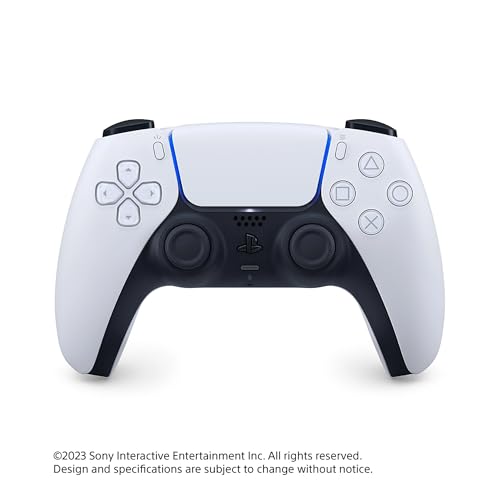
The DualSense is the PlayStation 5's controller, and on PC it offers something no other pad here can: genuinely physical feedback. Its haptic feedback simulates in-game actions and environments through far more detailed vibration than ordinary rumble motors, and its adaptive triggers vary their resistance under your fingers — drawing a bow, braking a car — in games that support them. Sony states that a range of blockbuster PC titles support these advanced features, and where they do, the DualSense is the most tactile controller you can plug into a PC. In other games it works as a high-quality standard pad, helped by Steam Input in Steam libraries.
The hardware is generous: a built-in microphone with a dedicated mute button, a 3.5mm headset jack, a built-in speaker, an integrated motion sensor and a Create button for capturing and sharing moments. It connects by USB Type-C cable or Bluetooth and works across Windows PC and Mac computers and Android and iOS phones, as well as the PS5 itself. If you own a PlayStation 5 and a PC, one DualSense can serve both — and if your favourite PC games are the big story-driven releases that support its features, it is the most interesting controller on this page.
Notable fact: the DualSense carries a built-in microphone and speaker, so voice chat and in-game audio cues can come straight from the controller in supported uses — no headset required for basic chat.
Key Details:
- Haptic feedback and adaptive triggers, supported in a range of PC titles
- Built-in microphone with mute button, 3.5mm jack and built-in speaker
- Integrated motion sensor and Create button
- Connectivity: Bluetooth or USB Type-C cable
- Works with Windows PC, Mac, Android, iOS and PlayStation 5
- 1-year manufacturer warranty
3. PowerA Advantage Plus Wired Controller (Night Blossom) — Best Wired Pad with Pro Features
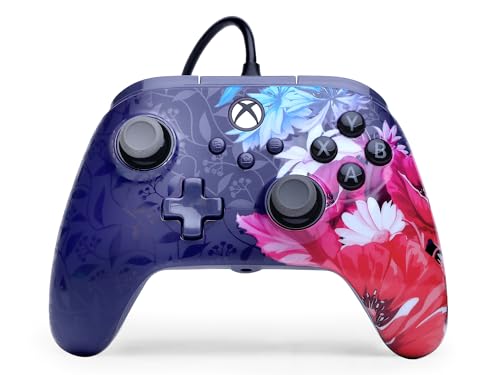
PowerA's Advantage Plus is what to buy when a standard pad feels limiting. It is officially licensed for Xbox Series X|S and works on Xbox One and Windows 10/11 PCs, and it packs in features the official controller leaves out: Hall Effect thumbsticks and triggers that use contact-free magnetic sensors, so there is nothing to wear into stick drift; Quick-Twist thumbsticks with three height settings (standard, medium and tall) that you swap in seconds to suit shooters or racers; and two Advanced Gaming Buttons on the back that you map on the fly, mid-game, without opening any software.
It is a wired controller, which here is a feature rather than a compromise: the extra-long 10-foot USB-C cable reaches from a PC or console to a sofa, input goes straight down the wire with no battery ever to charge, and dual rumble motors plus impulse triggers keep the feedback lively. A textured grip, anti-friction rings around the sticks and a 3.5mm headset jack round it out, and PowerA's Gamer HQ app lets you fine-tune audio, triggers, rumble and dead zones. The Night Blossom finish shown here is the listing's design; other finishes of the same controller exist. A 2-year limited warranty backs it — longer than most on this page.
Notable fact: the Quick-Twist thumbsticks are a rare party trick at any price — you physically twist the sticks to change their height between three settings, taller for precision aiming, shorter for fast movement.
Key Details:
- Officially licensed for Xbox Series X|S; works on Xbox One and Windows 10/11
- Hall Effect thumbsticks and triggers — contact-free magnetic sensors
- Quick-Twist thumbsticks with 3 height settings; 2 mappable back buttons
- Dual rumble motors and impulse triggers; 3.5mm stereo headset jack
- Wired with an extra-long 10 ft USB-C cable
- PowerA Gamer HQ app for tuning; 2-year limited warranty
4. Cosmic Byte Ares Pro — Best Value Tri-Mode All-Rounder
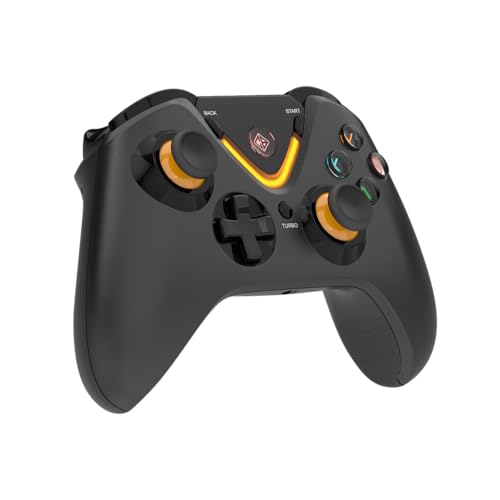
The Ares Pro is the controller that makes the expensive pads justify themselves. Cosmic Byte gives it tri-mode connectivity — a 2.4GHz dongle for the PC, Bluetooth for phones and laptops, and wired USB-C when you want it or the battery runs low — and then adds the hardware that usually costs far more: Hall Effect joysticks and triggers for drift-free control, a 1000Hz polling rate for fast input registration, and a programmable macro button on the back for recording sequences in fighting and action games. Turbo with adjustable speed covers the retro and shooter crowd.
Small touches mark it out as a PC-first pad: in dongle mode it even offers a wireless 3.5mm audio port, so your wired headset can stay plugged into the controller instead of the PC across the room. Backlit buttons and a textured grip finish the design, and it works across PC, Android and iOS. If you want one modern controller that does everything the current generation expects — wireless freedom, magnetic sticks, macros, fast polling — without paying console-brand money, this is the sensible middle of the market, backed by a 1-year warranty against manufacturing defects.
Notable fact: the wireless 3.5mm audio port is genuinely unusual — most wireless controllers drop headset audio entirely or only support it wired, so a dongle-mode headphone jack is a real convenience for desk setups.
Key Details:
- Tri-mode connectivity: 2.4GHz dongle, Bluetooth and wired USB-C
- Hall Effect joysticks and triggers; 1000Hz polling rate
- Wireless 3.5mm audio port in dongle mode
- Programmable macro rear button; turbo with speed adjustment
- Backlit buttons and textured grip
- Compatible with PC, Android and iOS; 1-year warranty against manufacturing defects
5. EvoFox Elite X2 Pro (White) — Best for Multi-Device Gaming
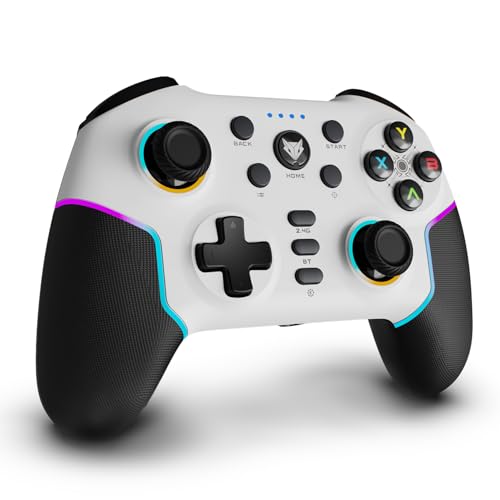
The Elite X2 Pro is EvoFox's flagship-style pad, built for people who game everywhere. Its tri-mode connection — 2.4GHz wireless, Bluetooth 5.0 and wired USB-C — covers PC, Android, iOS and the Nintendo Switch, and its HallSense magnetic triggers and joysticks keep the controls drift-free at a 1000Hz polling rate. RGB light strips and glowing joystick rings give it the gaming-desk look (they can be appreciated or ignored), the battery is rated at up to 16 hours per charge, and — a rarity — the joysticks themselves are replaceable, so a worn stick does not have to mean a new controller.
One compatibility note matters: EvoFox lists the X2 Pro for PC, Android, iOS and Switch, and states it is not for Xbox — so Xbox owners should look at the PowerA or the official controller above instead. For everyone else, particularly households splitting time between a PC and a phone or Switch, it is a well-specified pad with the magnetic-stick durability that used to be a premium-only feature. The white finish shown in the photo is the listing we checked; a black version is sold under its own listing.
Notable fact: replaceable joysticks are almost unheard of at this level — being able to swap the sticks extends the controller's life in a way sealed pads cannot match.
Key Details:
- Tri-mode connectivity: 2.4GHz wireless, Bluetooth 5.0 and wired USB-C
- HallSense magnetic triggers and joysticks; 1000Hz polling rate
- RGB strips and joystick glow; replaceable joysticks
- Battery rated up to 16 hours
- Compatible with PC, Android, iOS and Nintendo Switch (not Xbox)
6. EvoFox One S V2 (Black) — Best Budget Tri-Mode Controller
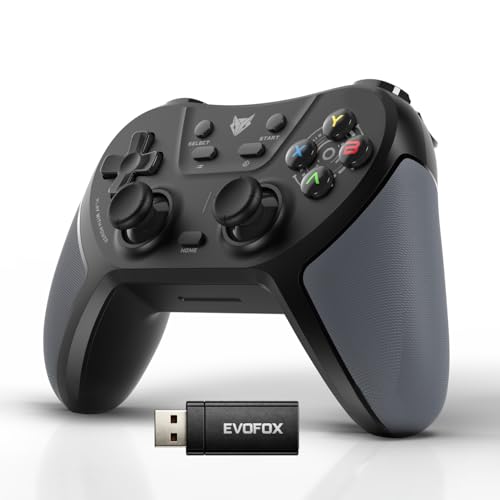
The One S V2 is the value end of EvoFox's range, and it is remarkably complete for the money end of the market. You still get tri-mode connectivity — a 2.4GHz "Hyper-Connect" dongle, Bluetooth 5.0 and wired USB-C — with a stated 10-metre wireless range, and you still get magnetic Hall Effect joysticks and analogue triggers with a 1000Hz polling rate. Programmable M, MR and ML macro buttons cover custom combos, haptic feedback handles the rumble, and the matte body with rubber grips keeps longer sessions comfortable.
The 400mAh battery is rated at up to 10 hours of play and refills over Type-C in about 2 hours, with an auto shut-off that sleeps the pad when it disconnects or sits idle. Compatibility is the widest on this page: PC, Android, iOS and iPadOS, plus PlayStation 4 per the listing — a genuine one-pad-for-every-screen option for households. If the Elite X2 Pro's RGB and replaceable sticks are more than you need, the One S V2 keeps the features that change how games feel and drops the decoration.
Notable fact: the included box contents go beyond the basics — EvoFox includes a USB extender cable alongside the Type-C charging cable, which helps position the wireless dongle for a clean signal.
Key Details:
- Tri-mode connectivity: 2.4GHz dongle, Bluetooth 5.0 and wired USB-C
- 2 magnetic Hall Effect joysticks and 2 analogue triggers; 1000Hz polling
- 400mAh battery, up to 10 hours playtime; Type-C full charge in about 2 hours
- Programmable M, MR and ML macro buttons; haptic feedback
- Compatible with PC, Android, iOS, iPadOS and PS4; 10 m wireless range
- 1-year manufacturing warranty
7. Redgear Pro Wireless Gamepad — Best Budget Wireless

Redgear's Pro Wireless has been one of India's default first gamepads for years, and the formula is easy to understand: a familiar Xbox-style layout, 2.4GHz wireless through a USB receiver with a range of up to 10 metres, a built-in lithium-ion battery so there are no AAs to buy, and proper force feedback from an integrated dual intensity motor that makes crashes, tackles and explosions land with weight. The ABXY keys are illuminated, which helps in a dark room more than you would expect.
It is a conventional-stick controller aimed squarely at Windows PC gaming, so it gives up the Hall Effect hardware, Bluetooth and multi-device reach of the pads above — what you get instead is the cheapest simple route from a keyboard to a wireless pad, with the little touches (backlit keys, rechargeable battery, real rumble) that the very cheapest no-name pads skip. For a first controller, a second pad for couch co-op, or PC gaming on a strict budget, it remains an easy recommendation, and it carries a 1-year warranty.
Notable fact: the dual intensity motor produces two strengths of vibration rather than a single buzz, so heavier in-game impacts feel heavier — a step up from the basic rumble of most budget pads.
Key Details:
- 2.4GHz wireless via USB receiver, up to 10 metres range
- Built-in rechargeable lithium-ion battery
- Integrated dual intensity motor for force feedback
- Illuminated ABXY keys
- Built for Windows PC gaming; 1-year warranty
8. Redgear Pro Wired Gamepad — Best Budget Wired

The wired member of Redgear's Pro family trades wireless freedom for the two things budget buyers should value most: the lowest price of entry and zero maintenance. The 1.8-metre USB cable plugs straight into a PC — no receiver to lose, no battery to charge, no connection dropouts — and the pad speaks both XInput and DirectInput, so modern Windows games recognise it instantly while older titles and emulators remain playable through the legacy mode. That dual-mode support is the wired model's quiet superpower: many budget pads only do one.
You keep the family features that matter: integrated force feedback, illuminated ABXY keys, two analogue sticks, two analogue triggers and 11 digital keys, in the same proven shell as the wireless version (the listing covers Windows 7, 8, 8.1 and 10, and the pad works as a standard XInput controller). If your desk setup keeps you close to the PC anyway — true for most PC gamers — the cable costs you nothing and buys complete simplicity. It also makes an ideal spare pad for player two.
Notable fact: the XInput/DirectInput switch means one pad covers both a modern Steam library and older or emulated games that only understand the older standard — no software workarounds needed.
Key Details:
- Wired USB connection with a 1.8-metre cable
- XInput and DirectInput compatible
- 2 analogue sticks, 2 analogue triggers and 11 digital keys
- Integrated force feedback; illuminated ABXY keys
- Listed for Windows 7/8/8.1/10 PCs; 1-year warranty
What About a Dedicated Flight Stick?
If you came here for flight simulation, everything above still works — a gamepad is a perfectly good way to fly casually — but a dedicated flight stick is the proper tool, and it is worth knowing what defines one before you spend. Look for a stick with a twist axis in the handle (that controls the rudder), an 8-way hat switch for looking around the cockpit, a throttle control (a slider on the base, or a separate throttle unit in a HOTAS set-up), and enough programmable buttons that your hands never leave the controls. Contact-free magnetic (Hall Effect) sensors, like the ones in the better gamepads above, are the durability feature to seek out here too.
The models flight-sim buyers worldwide usually consider are Logitech's Extreme 3D Pro (12 programmable buttons, an 8-way hat switch, a twist rudder control and a throttle on a weighted base), Thrustmaster's T.16000M FCS and its HOTAS version (magnetic H.E.A.R.T sensors, an ambidextrous stick, and a separate throttle in the HOTAS package), and Thrustmaster's T.Flight Hotas X (a full-size stick with a detachable full-size throttle). We name them as orientation only: when we checked Amazon India on 29 October 2026, stock of dedicated flight sticks there was inconsistent and largely import-led, and we could not verify a listing for any of them to the standard applied everywhere else in this guide — a live page whose stated specifications and photo we had confirmed.
So instead of a product link, here is a search link that shows whatever flight sticks Amazon India has in stock right now. Check the seller, the stated model number and whether the listing is an import (with its warranty implications) before ordering — and if the sim bug bites hard, the established sticks above are the benchmark to compare any listing against.
Browse flight sticks on Amazon India
Frequently Asked Questions
Does a PlayStation 5 controller work on a PC?
Yes. The DualSense connects to a Windows PC by Bluetooth or USB-C cable. In Steam, the Steam Input layer handles it across your library, and a range of PC titles — Sony highlights blockbuster releases — support its haptic feedback and adaptive triggers natively. Outside supported games it behaves as a standard, high-quality controller.
What is the difference between XInput and DirectInput?
XInput is the modern Windows standard built around the Xbox controller: games recognise an XInput pad instantly with the correct button prompts. DirectInput is the older, more flexible standard, still useful for retro games and emulators. A pad that offers both — like the Redgear Pro Wired — covers a modern library and an old one without fuss.
Is wired or wireless better for competitive gaming?
Wired has the lowest possible latency and never drops, which is why it remains the safe competitive choice. Modern 2.4GHz dongle connections and 1000Hz polling rates have narrowed the gap to the point where most players cannot feel it, so choose wireless for comfort and wired for absolute certainty. Bluetooth is the most convenient, and the slowest, of the three.
What is stick drift, and do Hall Effect sticks prevent it?
Stick drift is when a controller reports movement you did not make — a camera slowly rotating on its own is the classic symptom. It is caused by wear in contact-based stick sensors. Hall Effect sticks measure movement with magnets and no physical contact, removing that wear mechanism entirely, which is why several controllers in this guide advertise them as a headline feature.
Can I use one of these controllers with my phone or Android TV?
Several of them, yes. The Xbox controller and DualSense pair with Android and iOS over Bluetooth, and the Cosmic Byte and EvoFox pads list Android (and iOS) support across their Bluetooth and dongle modes. Check the individual listings for your exact device, and note that game support on mobile depends on the game, not the controller.
Do I need a flight stick to play Microsoft Flight Simulator?
No — the simulator fully supports gamepads, and any controller in this guide will fly it comfortably. A flight stick plus throttle simply makes the experience more natural and precise, particularly on longer flights. Start with a gamepad; upgrade to a stick when you know the hobby has you.
Conclusion
"Joystick" may mean two products, but the buying logic ends up simple. For ordinary PC gaming, choose by connection and sticks: the Xbox Wireless Controller if you want the standard everything is built for, the DualSense if your games support its haptics and triggers, the PowerA Advantage Plus for wired pro features, the Cosmic Byte Ares Pro or an EvoFox pad for tri-mode value with drift-resistant Hall Effect sticks, and a Redgear Pro if the budget rules. For flight simulation, use the guidance above and buy the stick itself only from a listing you have checked carefully. Follow the buttons through to Amazon.in for the live price of whichever pad fits — and game on.
Research note: every product in this guide was checked on Amazon India on 29 October 2026. Specifications are quoted from the listings and manufacturers as published; we do not print prices because they change frequently, so confirm the live price, delivery and warranty details on the product page before ordering. Flight-stick models are named for orientation only — no flight-stick listing met this guide's verification standard on the check date, so none is linked as a product.
This post contains affiliate links. As an Amazon Associate, we earn from qualifying purchases. This does not affect our editorial independence.
Keep exploring

Best Perfume in India (2026)
Discover the best perfume in India — 18 top-rated fragrances with prices, ratings, scent profiles, comparison tables & Amazon links.

Best Coffee Brands in India (2026)
Discover the best coffee brands in India — Bru, Nescafé, Tata Coffee, Sleepy Owl, Rage Coffee, Continental & more.

Best Tea Brands in India (2026)
Discover the best tea brands in India — from Tata Tea and Brooke Bond to VAHDAM, Teabox, and Makaibari.